


TanStack, the team behind TanStack Query, Router and Start, has released Redact. It runs your existing React components and hooks, unchanged, on a runtime about a third the size of React’s. The catch is that rendering is synchronous, so React’s concurrent features are gone. Here’s how it works, what it costs, and when it’s worth trying.
What is TanStack Redact?
Redact (@tanstack/redact) is a small runtime that implements React’s public API: JSX, hooks, context, refs, Suspense, portals, error boundaries, SSR and hydration. Its README sums it up as „React, redacted”. It isn’t a fork of React or a new framework. A Vite plugin swaps the react, react-dom and JSX runtime imports for Redact at build time, so your application code doesn’t change.
Preact also offers React compatibility, but through a separate preact/compat layer. Tanner Linsley, TanStack’s creator, says that layer was getting harder to keep in line with React 19. He describes Redact as a projection of React’s API, built only for the parts TanStack Start needs: „I wanted React’s public API projected at a different scope.”
Getting started
Redact is still pre-1.0 (the latest npm release is 0.1.4), so pin an exact version:
pnpm add --save-exact @tanstack/redactThen add the Vite plugin. It covers both client and SSR builds:
// vite.config.ts
import { defineConfig } from 'vite'
import { redact } from '@tanstack/redact/vite'

export default defineConfig({
  plugins: [redact()],
})
Your components keep their normal imports. At build time, import { useState } from 'react' resolves to Redact. The React Server Components environment still uses real React, so @vitejs/plugin-rsc keeps handling Server Component serialization.
Presets and feature flags
Redact has two presets. full is the default and turns on every optional feature except native animation. nano starts with every optional feature off. In both, you switch individual features on or off and pay only for what you ship:
// A client-only SPA: no SSR hydration, no class components
redact({ features: { hydration: false, classComponents: false } })

// Smallest possible runtime, adding back only context
redact({ preset: 'nano', features: { context: true } })

// Experimental: native View Transition animations
redact({ features: { viewTransitions: true } })| Flag | What happens when it’s false | Approx. saving (gzip) |
|---|---|---|
hydration | hydrateRoot throws. Use createRoot instead. | ~1.3 KB |
suspense | No fallback UI. Thrown promises still retry once they settle. | ~0.8 KB |
classComponents | Only constructor, render and setState work. No lifecycles or error boundaries. | ~180 B |
memo | No prop-equality bailout. Components always re-render. | ~80 B |
forwardRef | No wrapper forwarding. Plain ref props still work. | ~70 B |
context | Providers don’t pass values down, so every read returns the default value. | ~60 B |
portal | Children render in place instead of in the target container. | ~30 B |
lazy | Only payloads that are already synchronous resolve. | ~10 B |
nano saves about 2.5 KB. Figures come from the project’s size analysis.Bundle size: about 66% smaller
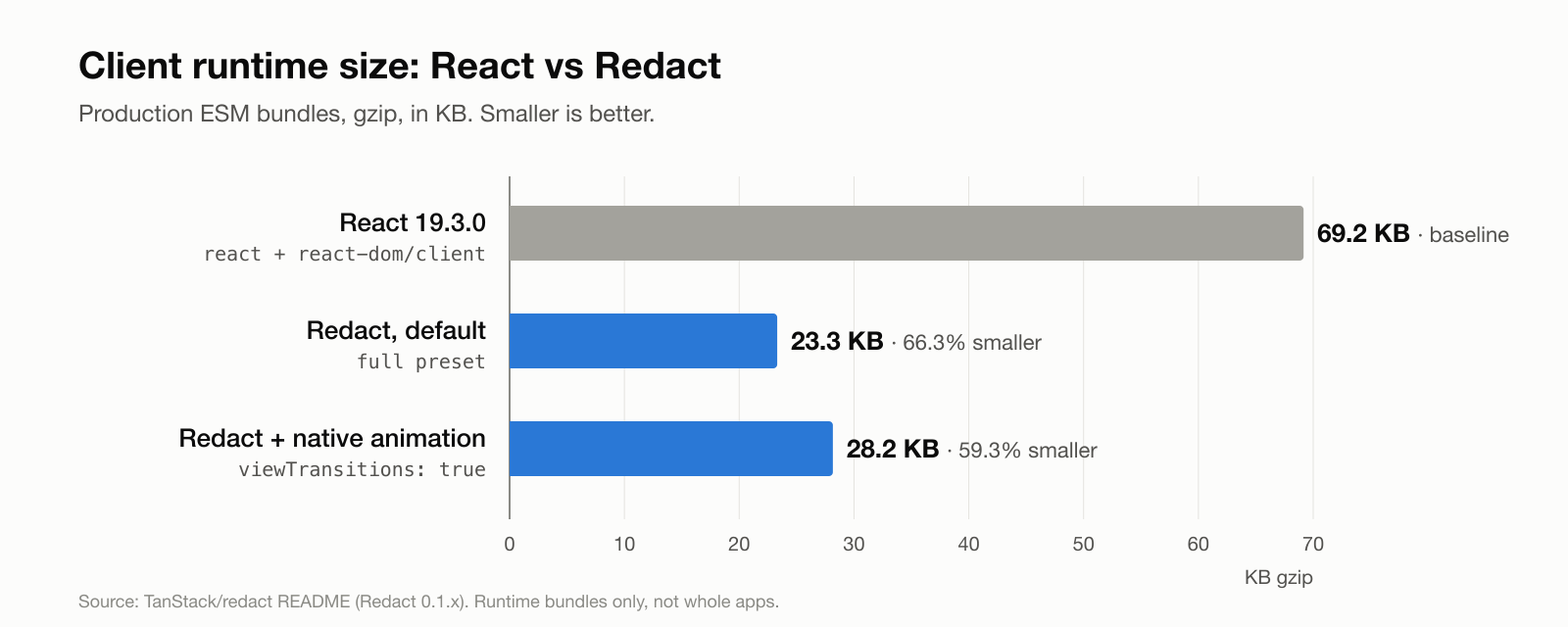
| Runtime / entry | Gzip | vs React |
|---|---|---|
| React 19.3.0 (client runtime) | 69.2 KB | baseline |
| Redact, default config | 23.3 KB | 66.3% smaller |
| Redact + native animation | 28.2 KB | 59.3% smaller |
Redact DOM client, nano preset | 12.5 KB | DOM client only |
| Redact server entry | 9.0 KB | SSR |
Where do those ~46 KB go? According to the project’s size analysis, most of the saving comes from parts of React that Redact leaves out or simplifies: the Fiber reconciler with its double-buffered tree (~12 KB), the synthetic event system (~7 KB), the scheduler and priority lanes (~6 KB), and selective hydration (~5 KB).
Runtime performance: faster updates, slower Suspense
A smaller bundle doesn’t automatically mean a faster app. The Redact README includes browser microbenchmarks (Apple M5 Pro, Chrome 152, production builds), and the results are mixed:
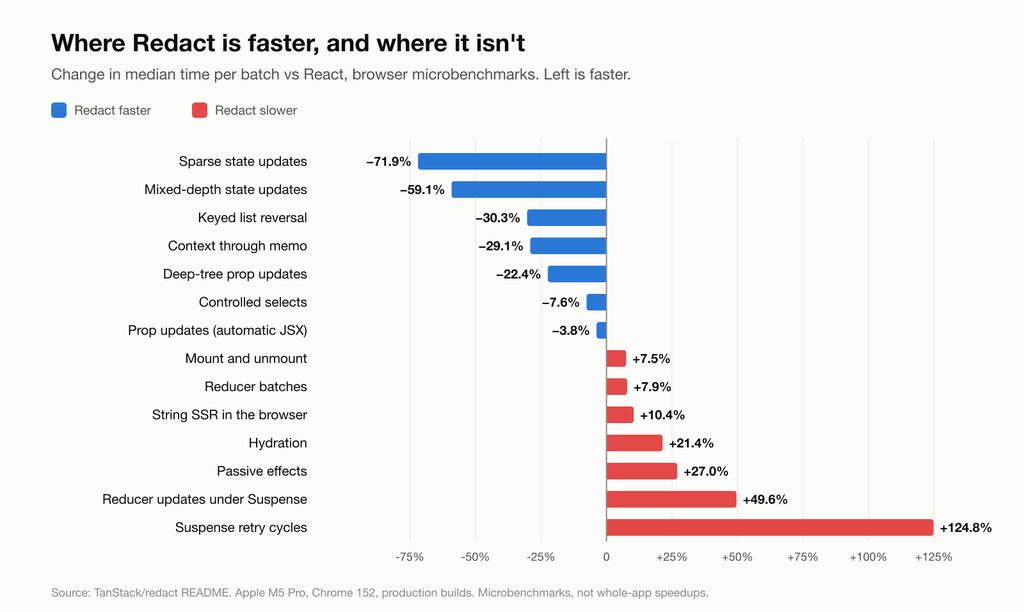
- Faster: state and prop updates, list reordering and context propagation. These are the everyday interactions most apps rely on.
- Slower: hydration, passive effects (
useEffect) and especially Suspense. The README notes the +124.8% for Suspense retries works out to about 0.15 ms extra per cycle. - Server: on Node 24, fully-ready stream rendering took about 49% less time, and string SSR with hooks and context about 31% less.
- Memory: on a 2,400-row fixture, click-to-commit was 1.2 ms vs 1.5 ms, but Redact retained more heap (762.5 KiB vs 666.4 KiB).
In production
Redact already runs two real sites: tanstack.com and Tanner Linsley’s blog. In May 2026, on an earlier version, he reported these numbers:
| Site | Metric | React | Redact | Change |
|---|---|---|---|---|
| tannerlinsley.com | JS transferred | 144.1 KB | 96.5 KB | −33% |
| tannerlinsley.com | First Contentful Paint | – | – | −18.1% |
| tannerlinsley.com | Largest Contentful Paint | – | – | −12.1% |
| tanstack.com | Client JS shipped | – | – | ~980 KB less |
| tanstack.com | LCP on RSC-heavy pages | – | – | 8–43% worse |
| Benchmark | 480-row list re-render | 45.5 ms | 37.3 ms | −18% |
The trade-off: no concurrent rendering
This is the part that matters for real projects. Redact renders synchronously. There is no time slicing, no priority lanes and no interruptible work. The APIs still exist, so your code compiles, but they behave differently:
| API | React | Redact |
|---|---|---|
startTransition / useTransition | Low-priority, interruptible update | Runs synchronously. isPending is always false. |
useDeferredValue | Lags behind during heavy renders | Returns its input unchanged |
useOptimistic | Optimistic overlay while an action runs | No overlay. The setter does nothing. |
useActionState | Runs the action, tracks pending state | Returns the initial state and false. The action doesn’t run. |
useFormStatus | Reports form submission state | Always idle |
StrictMode, Profiler, DevTools | Supported | Pass-through or not supported |
| Server Components | Supported | Uses upstream React |
Take a typical search-as-you-type component. In React, the transition lets the input stay responsive while a large list re-renders:
import { useState, startTransition } from 'react'

function ProductSearch({ products }) {
  const [query, setQuery] = useState('')
  const [filter, setFilter] = useState('')

  const results = products.filter((p) =>
    p.name.toLowerCase().includes(filter.toLowerCase()),
  )

  return (
    <>
      <input
        value={query}
        onChange={(e) => {
          setQuery(e.target.value) // urgent: update the input
          startTransition(() => setFilter(e.target.value)) // React: low priority
        }}
      />
      <ProductList items={results} />
    </>
  )
}
On Redact, both updates run in the same synchronous render. With thousands of items, typing starts to lag, which is the exact effect shown in the demo by azukiazusa. The fix is to do the scheduling yourself, for example with a short debounce. This works the same way on both runtimes:
const [query, setQuery] = useState('')
const [filter, setFilter] = useState('')

useEffect(() => {
  const id = setTimeout(() => setFilter(query), 150)
  return () => clearTimeout(id)
}, [query])
For very long lists, virtualization (for example TanStack Virtual) helps more than either approach, because it renders only the rows on screen.
Check your codebase in one command
Before you try Redact, find the code that depends on concurrent features or Actions:
grep -rnE "useTransition|startTransition|useDeferredValue|useOptimistic|useActionState|useFormStatus" src/If this returns nothing, or only a few places you can rewrite, Redact is a realistic option. Also check your dependencies: a UI library that relies on transitions internally will behave differently too.
Should you use it?
- Good fit: content sites, marketing pages, blogs, landing pages and small Vite or TanStack Start apps, where JavaScript size directly affects Core Web Vitals and concurrent features aren’t used.
- Try with care: apps that use Suspense heavily or depend on hydration speed. Benchmark your own key pages first.
- Not yet: large interactive apps built around transitions,
useOptimisticor form Actions, Next.js projects (Redact ships a Vite plugin), and teams that rely on React DevTools.
Keep in mind that Redact is at version 0.1. TanStack doesn’t present it as a replacement for React, it isn’t a dependency of any other TanStack package, and Linsley has said he deliberately isn’t promoting it as an „alternative React”. It is an experiment you can adopt, not a new default.
The interesting part of Redact isn’t the 46 KB. It’s the idea that a well-specified API can have more than one implementation, each sized for a different job.
Want to know whether a smaller runtime would improve your Core Web Vitals? Talk to the Fireup team. We’ll audit your bundle and tell you where the kilobytes actually go.


