


„You’ve hit your session limit” is the message no Claude Code user wants to see in the middle of a refactor. The limits themselves aren’t secret, but most developers only find out how they work when they run into one. This guide explains the five-hour and weekly windows, shows how to keep your usage visible in the status line, adds a hook that warns you before you hit the wall, and lists the habits that actually make your plan last longer.
How Claude Code usage limits work
If you sign in to Claude Code with a Pro, Max, Team or Enterprise plan, you don’t pay per token. Instead, your plan gives you a usage allowance measured in two windows at the same time:
- The five-hour window. A rolling session allowance. When it runs out, you wait until the reset time shown in the message.
- The weekly window. A cap over seven days. Every request counts against both windows, so a single heavy burst (a large fan-out of subagents, for example) can use up the weekly allowance before the five-hour window even resets.
- Model limits. Some plans also have a separate Opus or Sonnet limit that applies only to that model family.
The allowance is shared with Claude chat, so a long conversation on claude.ai draws from the same pool as your terminal sessions. If you use Claude Code with an API key, Bedrock, Vertex or Foundry instead, none of this applies: you pay per token and your limits are spend limits and rate limits set by your organization.
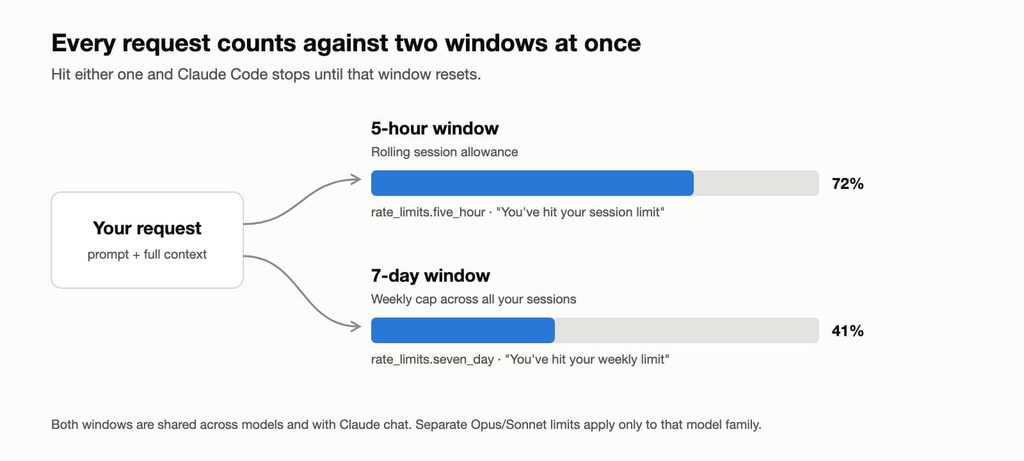
The message you see tells you which limit you hit, and that decides what you can do about it:
| Message | What it means | Does switching model help? |
|---|---|---|
You've hit your session limit · resets 3:45pm | The five-hour window is used up | No. It’s shared across all models. |
You've hit your weekly limit · resets Mon 12:00am | The weekly window is used up | No. It’s shared across all models. |
You've hit your Opus limit / Sonnet limit | The limit for that model family is used up | Yes. /model to a model outside that family keeps you working. |
| Context or auto-compact warning | Not a usage limit. The conversation is close to the context window. | No. Use /compact or /clear. |
Step 1: Check where your usage goes with /usage
Run /usage inside Claude Code. On a subscription plan it shows your plan usage bars and when each window resets. Below them is the part most people skip: a breakdown of what used your allowance.
- Attribution: the share of recent usage that went to skills, subagents, plugins and individual MCP servers.
- Recommendations: one row per habit behind at least 10% of your usage, for example
25% Trim ~/code/api/CLAUDE.md · 49k tokens per request. The percentage is how much of your usage the row applies to, not how much you’ll save. - Loops: the heaviest
/loopand scheduled tasks, with tokens per run. A loop keeps sending your full context even while you’re away. - Fix shortcut: when the footer says
f to fix, pressfand Claude Code applies the recommendations it can, showing you each change first.
Press d or w to switch between the last 24 hours and the last 7 days. The breakdown is built from session history on this machine, so it doesn’t include claude.ai or your other computers. The usage bars at the top do.
Two more commands help: /context shows what is filling your context window right now (CLAUDE.md, MCP tools, files, conversation), and /insights writes an HTML report about how you work across your recent sessions.
Step 2: Keep your usage in the status line
/usage is useful, but you have to remember to run it. A status line keeps the numbers on screen all the time. Claude Code sends your status line script a JSON object on every update, and for Pro and Max subscribers it includes a rate_limits object with both windows:
"rate_limits": {
  "five_hour": { "used_percentage": 23.5, "resets_at": 1738425600 },
  "seven_day": { "used_percentage": 41.2, "resets_at": 1738857600 }
}
The fastest way to get a status line is to ask for one: /statusline show model, context %, 5-hour and weekly usage. Claude Code writes the script and updates your settings. If you prefer to own the script, save this as ~/.claude/statusline.sh (it needs jq):
#!/bin/bash
input=$(cat)

MODEL=$(echo "$input" | jq -r '.model.display_name')
CTX=$(echo "$input" | jq -r '.context_window.used_percentage // 0' | cut -d. -f1)
FIVE_H=$(echo "$input" | jq -r '.rate_limits.five_hour.used_percentage // empty' | cut -d. -f1)
WEEK=$(echo "$input" | jq -r '.rate_limits.seven_day.used_percentage // empty' | cut -d. -f1)
RESET=$(echo "$input" | jq -r '.rate_limits.five_hour.resets_at // empty')

# Save the latest numbers for the warning hook (step 3)
if echo "$input" | jq -e '.rate_limits' > /dev/null; then
  echo "$input" | jq -c '.rate_limits' > "${CLAUDE_CONFIG_DIR:-$HOME/.claude}/usage-cache.json"
fi

LINE="[$MODEL] ctx ${CTX}%"
if [ -n "$FIVE_H" ]; then
  # macOS uses date -r, Linux uses date -d
  AT=$(date -r "$RESET" +%H:%M 2>/dev/null || date -d "@$RESET" +%H:%M)
  LINE="$LINE · 5h ${FIVE_H}% (resets $AT)"
fi
[ -n "$WEEK" ] && LINE="$LINE · week ${WEEK}%"
echo "$LINE"
Make it executable with chmod +x ~/.claude/statusline.sh and add it to ~/.claude/settings.json:
{
  "statusLine": {
    "type": "command",
    "command": "~/.claude/statusline.sh"
  }
}
You’ll see something like [Opus 5.5] ctx 34% · 5h 72% (resets 15:45) · week 41%. Two details to know: rate_limits only appears after the first response in a session, and only for claude.ai Pro and Max subscribers, which is why the script falls back quietly when it’s missing. The context percentage is a different number: it’s how full the current conversation is, not your plan.
Step 3: Get a warning before you hit the limit
A status line only helps if you look at it. A UserPromptSubmit hook runs every time you send a prompt, so it can warn you when you cross a threshold. Hooks don’t receive the rate_limits data themselves, which is why the status line script above saves the latest numbers to usage-cache.json. The hook reads that file. Save it as ~/.claude/hooks/usage-warning.sh:
#!/bin/bash
CACHE="${CLAUDE_CONFIG_DIR:-$HOME/.claude}/usage-cache.json"
THRESHOLD=80
[ -f "$CACHE" ] || exit 0

NOW=$(date +%s)
# Ignore a window whose reset time has already passed
pct() {
  jq -r --arg w "$1" --argjson now "$NOW" \
    '.[$w] | if . and .resets_at > $now then .used_percentage else 0 end' "$CACHE" | cut -d. -f1
}
FIVE_H=$(pct five_hour)
WEEK=$(pct seven_day)

if [ "$FIVE_H" -ge "$THRESHOLD" ] || [ "$WEEK" -ge "$THRESHOLD" ]; then
  jq -n --arg msg "Usage is high: ${FIVE_H}% of the 5-hour window, ${WEEK}% of the week. Consider /clear, a smaller model or a lower /effort." \
    '{systemMessage: $msg}'
fi
exit 0
Then register it next to the status line in settings.json:
{
  "statusLine": {
    "type": "command",
    "command": "~/.claude/statusline.sh"
  },
  "hooks": {
    "UserPromptSubmit": [
      {
        "hooks": [
          { "type": "command", "command": "~/.claude/hooks/usage-warning.sh" }
        ]
      }
    ]
  }
}
The systemMessage field shows the warning to you, not to Claude, so it doesn’t change the answer you get. Run /hooks to check the hook is registered. If you’d rather stop and decide than just be warned, return {"decision": "block", "reason": "..."} instead and the prompt won’t be sent.
Using several accounts? Both scripts store their cache under $CLAUDE_CONFIG_DIR, so if you followed our guide to running multiple Claude Code accounts, each profile tracks its own limits. Add the same statusLine and hooks block to each profile’s settings.json.
Step 4: What to do when you hit the limit anyway
- Let Claude Code continue on its own. Since v2.1.234, when a limit stops Claude mid-task in an interactive session, Claude Code waits and picks the task up after the reset. Keep the session open.
Esccancels the wait, and/rate-limit-optionslets you start it again or choose another option. You can turn it off with Continue automatically at usage limit in/config. - Switch model, but only for a model limit. After an Opus or Sonnet limit,
/modelto a model outside that family works. After a session or weekly limit it doesn’t. The first request on the new model re-reads the whole conversation without cache, so a/clearfirst is often cheaper. - Buy more usage.
/usage-creditsopens your usage credit settings on Pro and Max, or sends a request to your admin on Team and Enterprise. - Upgrade the plan if you hit the weekly limit every week. That’s a sign your normal workload is bigger than your plan, not a bad day.
9 habits that make your plan last longer
Claude Code sends the whole conversation with every request. Prompt caching makes that cheaper, but a one-line question in a session that has been open all day still pays for the whole day’s context. Most savings come from keeping that context small:
/clearbetween unrelated tasks. It costs nothing. Use/renamefirst if you want to come back with/resume.- Don’t come back to a huge session after lunch. The first message after a break longer than the cache lifetime misses the cache and re-processes everything. Start fresh, or
/compactbefore you leave. - Match the model to the task. Use Opus for architecture and hard debugging, Sonnet for most coding, and Haiku for simple subagent work (
model: haikuin the subagent config). - Lower the effort for simple work. Thinking tokens count as output.
/effortlets you use less reasoning on routine edits. - Keep CLAUDE.md short. It’s loaded into every request. Move workflow-specific instructions (deploys, migrations, PR reviews) into skills, which load only when needed. Anthropic suggests staying under 200 lines.
- Disable MCP servers you aren’t using with
/mcp, and prefer CLI tools likeghwhere they exist. - Send noisy work to subagents. Test runs, logs and docs lookups stay in the subagent’s context, and only a summary comes back.
- Watch your loops and agent teams. A
/loopfires even while you’re idle, and agent teams can use around 7× the tokens of a normal session. - Be specific, and plan first. „Improve this codebase” makes Claude read everything. „Add validation to the login function in
auth.ts” doesn’t. For bigger changes, use plan mode (Shift+Tab) so you don’t pay for work in the wrong direction.
Most people hit their limit because of long sessions, not hard tasks.
/clearis the cheapest command in Claude Code.
Where a second account fits
Our post on using multiple Claude Code accounts is about keeping work and personal environments separate, for example a company Team seat and your own Pro plan. It isn’t a way to stack personal subscriptions to get around limits. If your own plan keeps running out, usage credits or a higher plan is the clean fix. Each account has its own limits, so with the setup above each profile shows its own numbers.
Rolling out Claude Code across a team and want predictable usage and costs? Talk to the Fireup team. We’ll help you set up the right plans, shared settings and hooks for your developers.


